
Team Calendar
A shared calendar inside Telegram.
Add a calendar to a Telegram group in about one minute, or use My Calendar privately. No separate account or password required.
SafePi is a local network security product developed by Safepify Oy. It controls where devices on your network are allowed to connect.
Instead of relying only on lists of known malicious destinations, SafePi can deny destinations that have not been explicitly trusted. The question is not only who is allowed to reach your network, but also where devices inside your network are allowed to connect.
SafePi Basic provides allowlist-based protection for normal web browsing as a one-time purchase. Subscriptions are optional add-ons for SafeSearch enforcement, advanced control, and stricter network-level enforcement.
If a destination isn't trusted, the protected connection is blocked. Filtering happens locally on your network, keeping protection predictable and under your control.
SafePi is designed for small organizations, clinics, public and shared networks, schools, assisted-living environments, and homes where predictable, controlled internet access matters.
Local-first protection
SafePi is designed so filtering and logging happen locally on the SafePi device inside your own network — not in a cloud dashboard.
All filtering and logging happens locally on the SafePi device on your network.
The management interface is only accessible from inside your LAN.
No cloud account or login is required for core protection.
SafePi is designed for environments where browsing should be safe and predictable — without relying on cloud-managed policy platforms or complicated setup on every device.
Controlled outbound destinations for staff, shared devices, and visitor networks.
Safer browsing for visitor networks, libraries, waiting areas, and shared community spaces.
Controlled access designed for focused use and reduced exposure.
Controlled browsing without requiring users to make complex security decisions.
Consistent protection for devices on the same Wi-Fi network.
SafePi can help older computers browse more safely by allowing only explicitly trusted web destinations.
SafePi does not replace operating system updates or antivirus software.
Filtering happens directly on your network, and the management interface is only accessible from within it.
SafePi sits between your devices and the internet and applies a simple but strict rule: allow what is trusted, deny what is unknown.
A traditional firewall primarily controls who may initiate connections into your network. SafePi complements that protection by controlling where protected devices may initiate connections to. It does not replace a firewall, operating system updates, or endpoint security.
SafePi can operate in Basic (proxy) mode or in SafeDNS Guard mode together with the SafePi Shield Router.
In Basic mode, SafePi provides allowlist-based protection for normal web browsing by allowing only explicitly trusted web destinations through the local proxy.
Basic mode requires a small per-device setup: set the SafePi proxy IP and port in your device's network settings.
SafeDNS Filtering is an optional, separate DNS-level protection layer powered by the open-source Pi-hole® engine. Without the SafePi Shield Router, each device — or your existing router — must be configured to use SafePi as its DNS server for SafeDNS Filtering and DNS-based features such as SafeSearch Guard to apply.
With the SafePi Shield Router, devices connected to the Safepify network use SafePi DNS automatically, so no per-device DNS configuration is required.
SafePi includes a Safepify-maintained default allowlist covering common global services, selected infrastructure needed for legitimate services to work, and services relevant to the country where SafePi is used. For example, a SafePi used in Finland can receive support for Finnish services such as Finnish banks, without automatically including country-specific services intended for Estonia.
Administrators can add device-specific custom domains from the SafePi web interface. These custom approvals are merged into the final active allowlist shown on the device.
For advanced control, SafePi supports Git-based SafeList Sync. When enabled, the Git SafeList replaces the maintained Safepify base allowlist for that device, while device-specific custom approvals can still be added locally.
Optional policy rules can schedule different Git SafeLists, apply stricter browsing windows, filter explicit results from common search engines, limit YouTube to a more restricted viewing mode, or switch the device into block-all mode outside approved times. Policy and SafeList changes are audited for inclusion in the Security & Transparency report.
SafePi is managed through a local web interface available only within your network (LAN) at http://safepi.local. It is not exposed to the internet.
Administrators can review blocked requests in real time, adjust allowlists, enable or disable optional features, and manage subscription plans from the interface.
A dedicated setup page at http://safepi.local:8080/setup provides clear instructions for configuring proxy settings on devices.
SafePi prioritizes predictable, controlled internet access over unrestricted internet access. Because unknown destinations are denied, a legitimate website or application may occasionally require an additional domain or backend service to be approved.
Basic proxy mode is generally less restrictive. SafeDNS Guard is intentionally stricter and may expose more service dependencies. Live visibility, Page Doctor, and SafeDNS Guard approval tools are designed to make these cases understandable and manageable.
SafePi Basic makes decisions at the domain level through the proxy. This is often enough for normal browsing and many legitimate services.
SafeDNS Guard is stricter. It enforces policy at the network level and may occasionally require approval of legitimate backend infrastructure used by apps.
This stricter model reduces common bypass paths while keeping approvals visible and manageable.
SafePi Basic provides allowlist-based protection for normal web browsing. Some applications and system services, however, may bypass proxy settings. In addition, QUIC / HTTP-3 traffic and direct IP connections are outside the scope of traditional proxy filtering.
For environments that need stricter network-wide enforcement with fewer bypass paths, SafePi offers SafeDNS Guard.
The SafePi Shield Router creates a separate Safepify Wi-Fi network alongside your existing one. Devices that connect to it are protected automatically — no proxy setup, no DNS changes, nothing to configure.
Your existing Wi-Fi network is never touched. If SafePi needs maintenance, devices can simply switch back to your main network — no lockout, no disruption.
This makes the SafePi Shield Router safe to deploy even in environments where touching the main router is not an option.
SafePi is built to be easy to operate day-to-day while still providing clear visibility into what is being allowed or denied.
SafePi components — including backend logic and the web interface — are updated automatically to improve functionality and compatibility over time.
Updates are applied locally on the device and do not require cloud control. Operating system updates are managed separately.
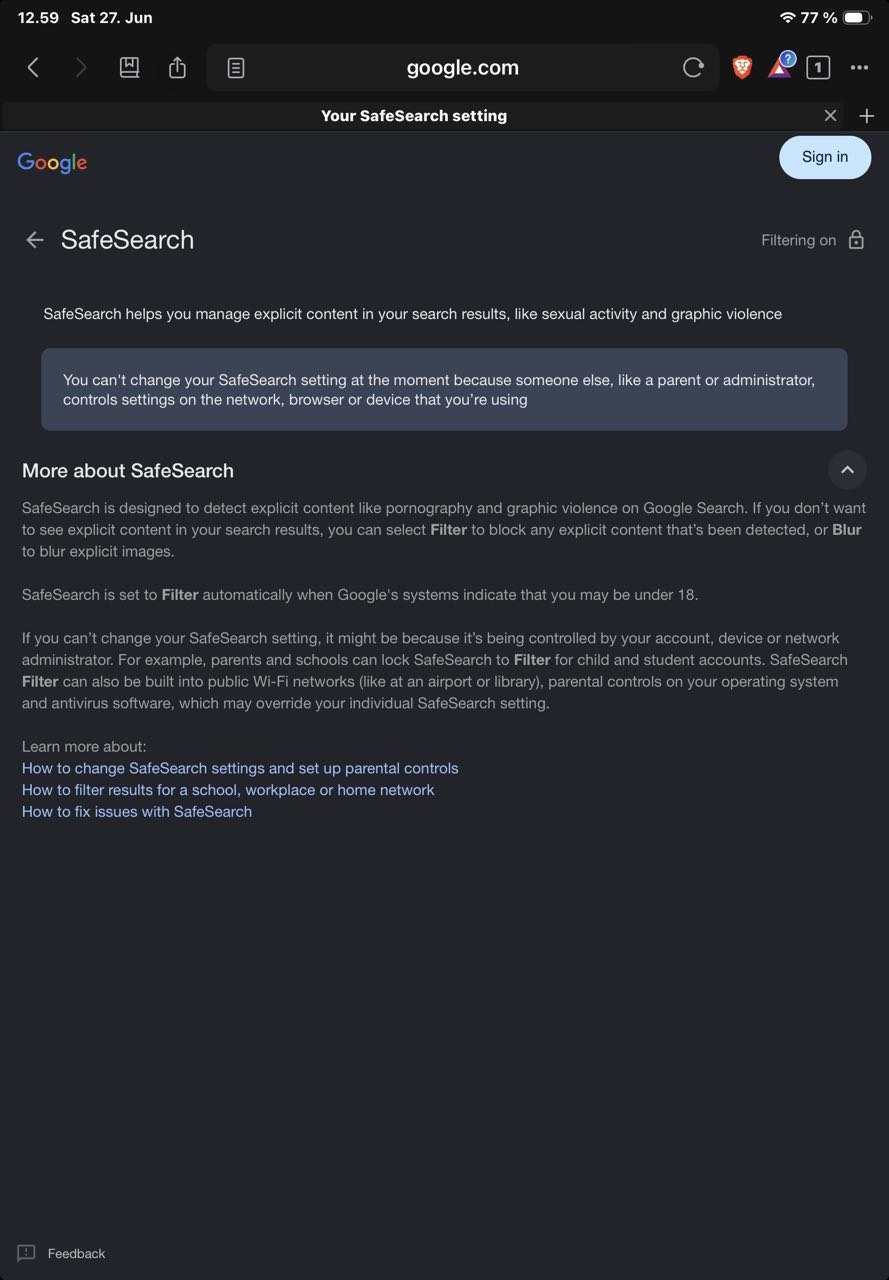
SafeSearch Guard locks Google, Bing, and YouTube to safe search mode network-wide. Users on the network cannot turn it off — it is enforced at the DNS level, not just suggested.
With the SafePi Shield Router, every device that joins the Safepify network is covered automatically. Without the router, SafeSearch works for any device or router that uses SafePi as its DNS server.
Requires SafeDNS Filtering to be enabled. Available with SafePi Plus.
When Mullvad VPN is active, SafeVPN Guard ensures that if the VPN connection drops, all outbound traffic stops immediately — no silent leaks to your real IP.
Implemented locally on SafePi via nftables. No router required. Available with SafePi Plus.
With Git-based SafeList Sync, SafePi can use policy rules to change protection automatically depending on time and need.
For example, a device can allow approved websites during opening hours and switch to block-all mode outside those hours.
schedules:
  - name: opening_hours
    days: [mon, tue, wed, thu, fri]
    time: "09:00-17:00"
    allowlist: allowlist.txt
  - name: default
    allowlist: none
Policy rules can also filter explicit search results, limit YouTube to a more restricted viewing mode, or select different Git SafeLists for different situations. Policy and SafeList changes are audited for inclusion in the Security & Transparency report.
Optional PIN protection can restrict sensitive actions, helping prevent unauthorized configuration changes.
Useful in family, public, and assisted-living environments.
SafePi provides clear visibility into network activity so administrators can understand why requests were allowed or denied.
In Basic (proxy) mode, SafePi shows live proxy denies. In SafeDNS Guard mode, SafePi shows live kernel drops.
If SafeDNS Filtering is enabled, SafePi also shows live DNS denies.
A dedicated statistics view summarizes blocked requests, allowed traffic, and the most active devices on the network.
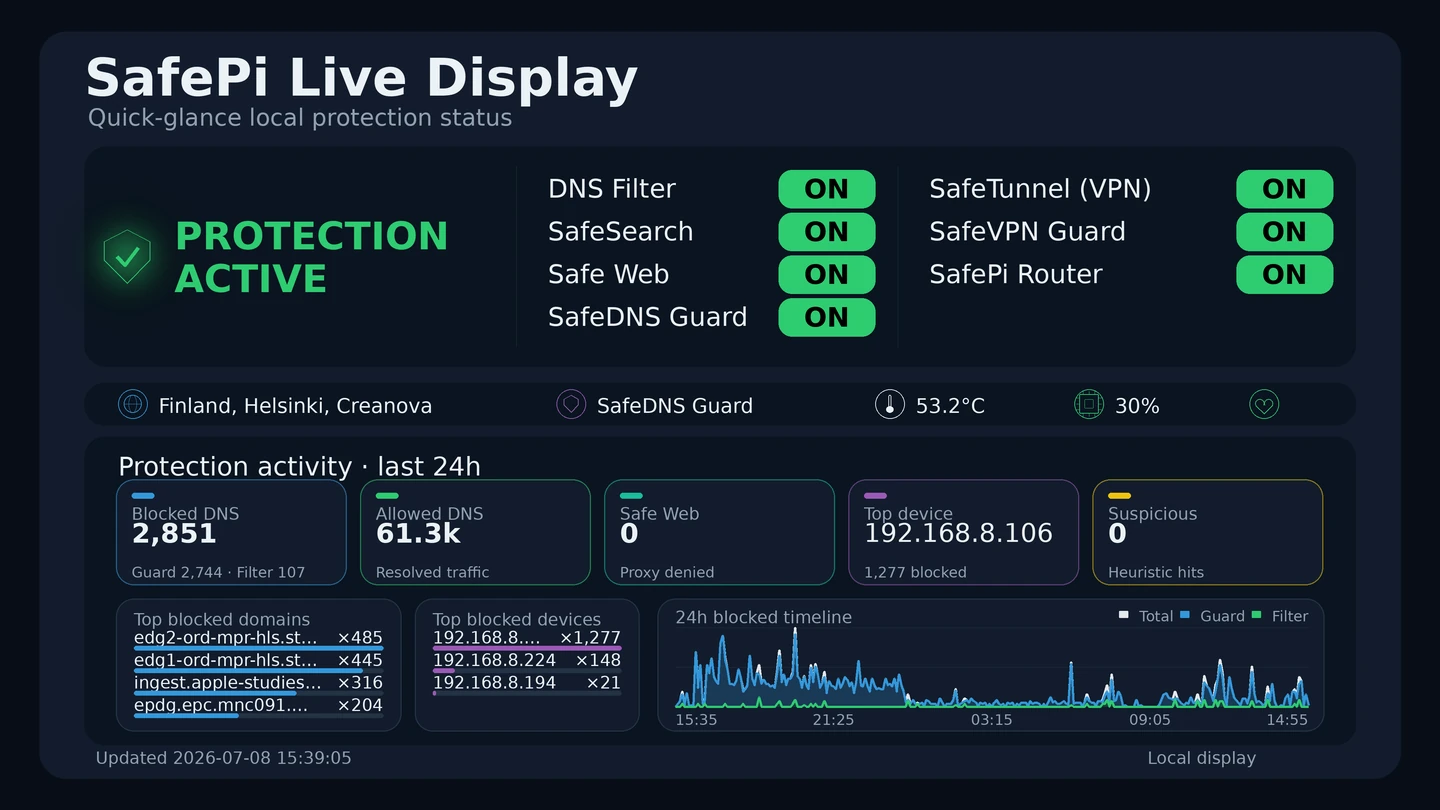
Connect any HDMI TV or monitor to SafePi and get an always-on status screen showing protection activity in real time — no login, no app, no configuration required.
The display shows active protection layers, blocked traffic, device activity, a 24-hour timeline, and outbound VPN exit location at a glance.
Designed for waiting rooms, front desks, and shared spaces where visible protection builds confidence — for staff and visitors alike.
The built-in Page Doctor analyzes blocked requests and can suggest which domains may be required for a page to function correctly, helping restore legitimate services while keeping the allowlist minimal.
When investigating unknown destinations, SafePi can also display additional IP intelligence such as hosting provider information and infrastructure signals.
Send a support request directly from the SafePi interface — no separate email or ticket system. Messages go straight to the Safepify team.
Available with SafePi Plus.
Optional subscription plans can be managed from the interface, including upgrades and cancellations.
Billing is handled through a secure payment provider.
The SafePi management interface is available only within your local network (LAN) and is not exposed to the internet.
SafePi does not rely on traditional login accounts or stored credentials. Access is limited to the local network, and sensitive actions can be protected with an optional PIN (Parent Guard), reducing unnecessary attack surface.
SafePi includes a maintained allowlist covering common global services, nationally relevant domains, and selected internet infrastructure needed for many legitimate services to work properly.
SafePi applies allowlist rules locally. You can add or remove domains using the LAN-only web interface.
SafeDNS Filtering uses the open-source Pi-hole® engine to block many advertising, tracking, and other unwanted domains — without changing what you allow.
Without the SafePi Shield Router, devices must use SafePi as their DNS server for this protection to apply. DNS can be configured on each device or centrally on an existing router. With the Shield Router, devices on the Safepify network use SafePi DNS automatically.
Pi-hole® is a trademark of Pi-hole LLC. SafePi is not affiliated with or endorsed by the Pi-hole project.
SafeDNS Guard upgrades SafePi from proxy filtering to network-level enforcement. Policy is applied at the router level — not just inside a browser or individual application.
Devices simply connect to the protected Safepify network provided by the SafePi Shield Router. No proxy configuration. No per-device software. No changes to your existing router.
Most security tools try to block "bad" websites. SafeDNS Guard takes a different approach: it allows only trusted sites — and nothing else.
Modern websites depend on shared infrastructure such as content delivery networks. SafeDNS Guard handles this safely by separating:
SafeDNS Guard learns only what belongs to the site — not the shared infrastructure behind it.
Infrastructure is allowed only to keep sites working — but it is never treated as trusted itself.
This prevents accidental expansion of trust to large shared platforms.
This helps prevent silent bypasses where a device routes around policy by switching DNS or tunneling out.
SafeDNS Guard automatically handles many real-world service dependencies. When a trusted domain is allowed, SafeDNS Guard can automatically permit verified subdomains and their resolved IPs with expiry.
This helps legitimate services keep working even when infrastructure changes in the background.
Only shared cloud or CDN infrastructure that cannot be confidently tied to the trusted service may require manual review.
In SafeDNS Guard mode, network-level blocks are shown in live kernel drops, where destinations are resolved into human-readable hostnames.
From there, administrators can review and add approvals when appropriate.
Page Doctor focuses on proxy-based analysis. SafeDNS Guard has its own dedicated enforcement view.
SafeDNS Guard includes a paginated approvals view showing each allowed IP and hostname, including why it was added and when it expires.
Every entry can be copied or removed instantly. Keep policy minimal and reversible.
SafePause lets you cut all client internet access instantly from the dashboard — with a single button. SafeDNS Filtering and local logging keep running. SafePi stays up and visible. Only outbound client traffic is blocked.
Useful for scheduled downtime, incidents, or enforced offline periods. Re-enable with the same button when ready. Requires the SafePi Shield Router. Available with SafePi Shield.
SafeDNS Guard is designed for homes, schools, guest Wi-Fi, assisted living, and small organizations where consistent enforcement matters.
The SafePi Shield Router directs traffic through SafePi so policy remains enforced across the network while staying manageable for the administrator.
SafePi supports optional integration with Mullvad VPN for encrypted outbound traffic. With SafeVPN Guard, a kill switch ensures that if the VPN connection drops, all internet traffic stops immediately — preventing silent IP leaks.
VPN usage is optional and configurable from the local interface. SafeVPN Guard is available with SafePi Plus.
Security transparency
SafePi generates a human-readable security report from your own network activity. The report explains what was blocked, why it was blocked, and whether suspicious behavior was detected — without showing browsing histories, page contents, passwords, or packet captures.
Anonymized sample report · 24h period · Proxy mode
"Most blocked activity observed during this period appears related to advertising, analytics, telemetry, or third-party web infrastructure."
The sample report was generated from a real SafePi deployment and automatically anonymized before export. Local IP addresses, device names, and identifying metadata were removed or generalized.
Hardware works on its own. Optional subscriptions can be enabled later from the SafePi interface.
SafePi is not just a router setting. It is a dedicated local security gateway that controls outbound destinations using allowlist-based browsing protection, with live visibility, Page Doctor diagnostics, updates to the Safepify-maintained default allowlist, local reporting, and optional stricter network-level enforcement.
Unlike ordinary router parental controls, SafePi is built around a deny-unknown model: unknown destinations are blocked by default, changes are visible, and protection can be documented through a Security & Transparency report.
€299
One-time device purchase
No subscription required for core protection
€348
SafePi device + Shield Router
Connect to Safepify. Everything is protected. Nothing to configure.
Buy Complete System€120
For existing SafePi device owners
Subscriptions are optional. SafePi Basic works without any monthly plan.
€14.99 / month
SafeSearch Guard works on any device using SafePi as DNS. With the Shield Router, every device on the Safepify network is covered automatically.
€39.99 / month
Requires SafePi Shield Router
SafePi Shield uses SafeDNS Guard together with the SafePi Shield Router to protect the entire network. The router ensures all traffic flows through SafePi, preventing bypass via direct connections or external DNS. SafePi Basic and SafePi Plus operate in proxy mode and do not require the router.
Safepify software
Different needs, same approach: simple to use, with the complexity kept underneath.
A shared calendar inside Telegram.
Add a calendar to a Telegram group in about one minute, or use My Calendar privately. No separate account or password required.

Your music, on your devices.
CalmAudio for Windows is the desktop player and home music server, available from the Microsoft Store. It plays your own music library and makes it available to companion devices on your home network.
iPhone and other browsers: the desktop edition includes a mobile web app (PWA), opened from the phone's browser and installable on the Home Screen. No separate iPhone app purchase is needed.
CalmAudio for Android: a free native companion app for listening to your desktop library on an Android phone, with offline Favorites. It needs the Windows desktop server to set up and supply music.
CalmAudio Radio: a separate, free Windows-only edition for listening to internet radio without your own music library.
SafePi uses a deliberately restrictive security model. These answers explain what that means in everyday use, what SafePi protects, and what it does not replace.
With SafePi Basic, proxy protection requires the SafePi proxy IP address and port to be configured on each device that should use it.
SafeDNS Filtering and DNS-based features such as SafeSearch Guard require devices to use SafePi as their DNS server. Without the Shield Router, this can be configured on individual devices or, where supported, centrally on your existing router.
With the SafePi Shield Router, devices connected to the Safepify network are directed through SafePi automatically, so no per-device proxy or DNS configuration is required.
SafePi prioritizes predictable, controlled internet access over unrestricted internet access. A legitimate website or application can therefore occasionally depend on a domain or backend service that has not yet been approved.
SafePi provides live deny information and Page Doctor to help identify what was blocked and keep additional approvals as limited as possible. SafeDNS Guard is intentionally stricter than Basic proxy mode and may expose more of these service dependencies.
No. A traditional firewall primarily controls who may initiate connections into your network. SafePi complements this by controlling where protected devices are allowed to initiate connections to.
SafePi also does not replace operating system updates, endpoint protection, secure passwords, or other normal security practices.
SafeDNS Filtering is optional DNS-level filtering powered by the open-source Pi-hole® engine. It blocks many advertising, tracking, and other unwanted domains using DNS blocklists.
SafeDNS Guard is the stricter Shield feature. It applies allowlist-based policy at the network level, restricts destinations that have not been explicitly trusted, and reduces common bypass paths such as external DNS and direct connections. SafeDNS Guard requires the SafePi Shield Router and a SafePi Shield subscription.
Blocklists depend on identifying a destination as unwanted or malicious before blocking it. An allowlist reverses the decision: destinations that have not been trusted are denied by default.
This reduces the set of destinations a protected device can contact, but it also means that new legitimate services may occasionally need approval.
Some can. SafePi Basic protects traffic that uses the configured proxy. Applications and system services that ignore proxy settings can communicate outside that path, and QUIC/HTTP-3 and direct IP connections are not covered by traditional proxy filtering.
SafeDNS Guard with the Shield Router is intended for environments where stricter network-wide enforcement and fewer bypass paths are required.
SafePi's filtering and logging are performed locally on the SafePi device. The management interface is available only on the local network.
SafePi receives updates to the Safepify-maintained default allowlist, which is adapted to the country where SafePi is used. This is separate from SafeList Sync: the optional Plus feature synchronizes the customer's own Git-based allowlist to SafePi, and Safepify does not manage the contents of that customer-maintained SafeList. Browsing history, page contents, and traffic data are not sent to Safepify as part of the filtering service.
No. SafePi Basic is a one-time hardware purchase and its Basic protection works without a monthly subscription.
Plus and Shield are optional service levels for additional features. Shield is required for SafeDNS Guard and requires the SafePi Shield Router.
Yes. SafePi Basic does not require the Shield Router. If you add a SafePi Shield Router, it creates a separate Safepify Wi-Fi network alongside your existing network rather than requiring you to replace or reconfigure your main router.
SafePi is designed for environments where controlled and understandable internet access is more important than unrestricted connectivity — including small offices and clinics, guest and public networks, schools, assisted-living environments, and homes.
It is particularly suited to networks where a local administrator wants to decide which destinations are trusted and have visibility into what is being denied.
Need help with SafePi or a blocked website? Send a message and we'll respond as soon as possible.
Setup guidance is also available on your local network at http://safepi.local:8080/setup.
Built in Finland, for Finnish networks

Founder, Safepify Oy · Finland
I built SafePi because I couldn't find a network security product that was honest about what it actually does, kept data local, and didn't require an IT department to operate.
I also wanted better protection for my own family network — including my 87-year-old mother, who still uses online banking and email independently.
SafePi is the kind of protection I wanted in my own home.
🇫🇮 Safepify Oy · Business ID: 3612963-1